POSC 8410: Doing Things With Data
Quarto, Data Manipulation, and plots
Where We Are
Tuesday you loaded real data and looked at it
Today we will change it, summarize it, and plot it
We’ll finish by rebuilding the résumé figure from Week 1
Reproducibility
A Cautionary Tale
Reinhart and Rogoff (2010) reported that economic growth falls sharply once government debt passes 90% of GDP
The finding was cited constantly in arguments for austerity after 2008
In 2013 a graduate student trying to replicate it found a spreadsheet error: several countries had simply been left out of a formula’s range
The corrected numbers looked materially different. Nobody caught it for three years, because nobody could see the analysis.
The Problem With Copy-Paste
The usual workflow: run code → copy a number → paste it into Word
Then you fix a data error and rerun. Which numbers in the document are now stale?
Six months later a reviewer asks where Table 3 came from. Can you say?
This is not [only] about virtue. It is about being able to trust your own results.
What Is a Quarto Document?
A single file (
.qmd) that holds your writing and your code togetherYou render it, and Quarto:
runs every chunk in order, in a clean session
drops the results, numbers, tables, figures, into the finished document
Change the data, re-render, everything updates
Your problem sets will be .qmd files. I recommend writing your final project (and journal articles) in quarto.
Anatomy of a .qmd
Three parts:
---
title: "My Analysis"
format: html
---

Here is ordinary text. **Bold** with asterisks.

```{r}
mean(anes$ft_biden, na.rm = TRUE)
```

More text explaining what that number means.
YAML header between the
---lines: settingsText: written in Markdown
Code chunks: opened with
```{r}
Rendering
Hit Preview. Quarto runs everything and produces an HTML file.
- or a PDF/DOCx if you select those options
Critically: it runs in a fresh session
- If it renders, it works from scratch.
“But it worked in the console!” - ok but will it reproduce later?
If it does not render, it is not done.
You Try (1)
File → New File → Quarto Document. Save it as
week2.qmdin your class folder.Delete the template junk below the YAML header.
Add a code chunk that loads the tidyverse and reads the ANES.
Add a sentence of text above it saying what the chunk does.
Render.
If you get an error about not finding the file, you already know what is wrong.
The Pipe
Nested Functions Are Unreadable
Suppose we want the mean Biden thermometer among people who voted.
To read that, you start in the middle and work outward. Now imagine four more steps.
The Pipe
|> takes the thing on its left and feeds it to the function on its right.
Read |> as “and then”: take the ANES, and then keep voters, and then grab that column, and then average it.
The Five Tidyverse Verbs
Almost Everything Is Five Verbs
filter()— keep some rowsselect()— keep some columnsmutate()— add a new columnarrange()— sort the rowsgroup_by()+summarise()— collapse to one row per group
This will get you 75% of the way there
filter(): Keep Some Rows
Note ==, not =.
== checks for equality, = makes an assignment.
filter(): Comparison Operators
| Operator | Means |
|---|---|
== / != |
equals / does not equal |
> < >= <= |
greater / less than |
& / | |
and / or |
is.na() |
is missing |
Commas separate conditions.
You Try (2)
How many respondents voted for Trump?
How many Trump voters rate BLM (
ft_blm) above 50?How many respondents are missing a value for
votechoice? (hint:is.na())
select(): Keep Some Columns
# A tibble: 3 × 3
  votechoice ft_biden ft_trump
  <chr>         <dbl>    <dbl>
1 <NA>              0      100
2 Other            15       15
3 Biden            85        0
Useful when a dataset has 350 columns and you care about a few.
mutate(): Make a New Column
Let’s build an actual measure. Affective polarization is often operationalized as how much warmer you feel toward your side than the other side.
anes <- anes |>
  mutate(affect_gap = ft_biden - ft_trump)

anes |>
  select(votechoice, ft_biden, ft_trump, affect_gap) |>
  head()
# A tibble: 6 × 4
votechoice ft_biden ft_trump affect_gap
<chr> <dbl> <dbl> <dbl>
1 <NA> 0 100 -100
2 Other 15 15 0
3 Biden 85 0 85
4 Biden 100 60 40
5 Trump 0 90 -90
6 Biden 100 0 100What Did We Just Do?
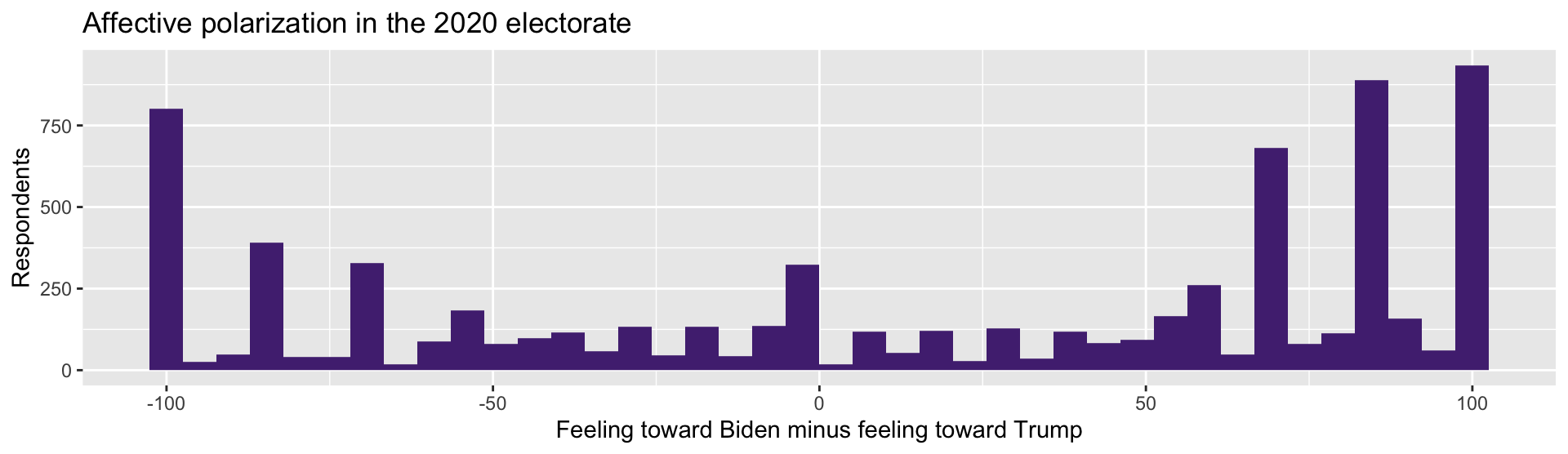
affect_gapruns from -100 (loves Trump, hates Biden) to +100 (the reverse)Zero means indifferent between the two
We did not download this variable. We constructed it from a definition.
This is measurement. It is a choice you have to defend. Why the difference and not the ratio? Why these two thermometers? Reasonable people argue about this (I’m one of them).
arrange(): Sort
anes |>
  filter(!is.na(votechoice)) |>
  group_by(votechoice) |>
  summarise(mean_police = mean(ft_police, na.rm = TRUE)) |>
  arrange(desc(mean_police))
# A tibble: 3 × 2
votechoice mean_police
<chr> <dbl>
1 Trump 85.3
2 Biden 62.2
3 Other 61.6desc() for descending. A 23-point gap in warmth toward the police.
group_by() + summarise()
This is the one that does the most work.
anes |>
  filter(!is.na(votechoice)) |>
  group_by(votechoice) |>
  summarise(
    n          = n(),
    mean_biden = mean(ft_biden,  na.rm = TRUE),
    mean_trump = mean(ft_trump, na.rm = TRUE)
  )
# A tibble: 3 × 4
votechoice n mean_biden mean_trump
<chr> <int> <dbl> <dbl>
1 Biden 3267 81.6 5.35
2 Other 151 41.3 28.3
3 Trump 2463 18.1 82.5 Read That Table
Biden voters rate Biden 81.6 and Trump 5.4
Trump voters rate Trump 82.5 and Biden 18.1
Near-perfect mirror images
Four lines of code, and you have measured affective polarization in the 2020 electorate. Data Analysis isn’t so bad, right?
Useful Summary Functions
| Function | Gives you |
|---|---|
n() |
number of rows in the group |
mean() / median() |
center |
sd() |
spread |
min() / max() |
range |
sum(x > 50) |
count meeting a condition |
Nearly all of them need na.rm = TRUE on real data.
You Try (3)
Using group_by() and summarise():
What is the mean
affect_gapfor eachvotechoicegroup?Add the number of people in each group with
n()Add the standard deviation of
affect_gap. Which group is more internally divided?
Plotting
The Grammar of Graphics
A ggplot is built from three things:
Data — the data frame
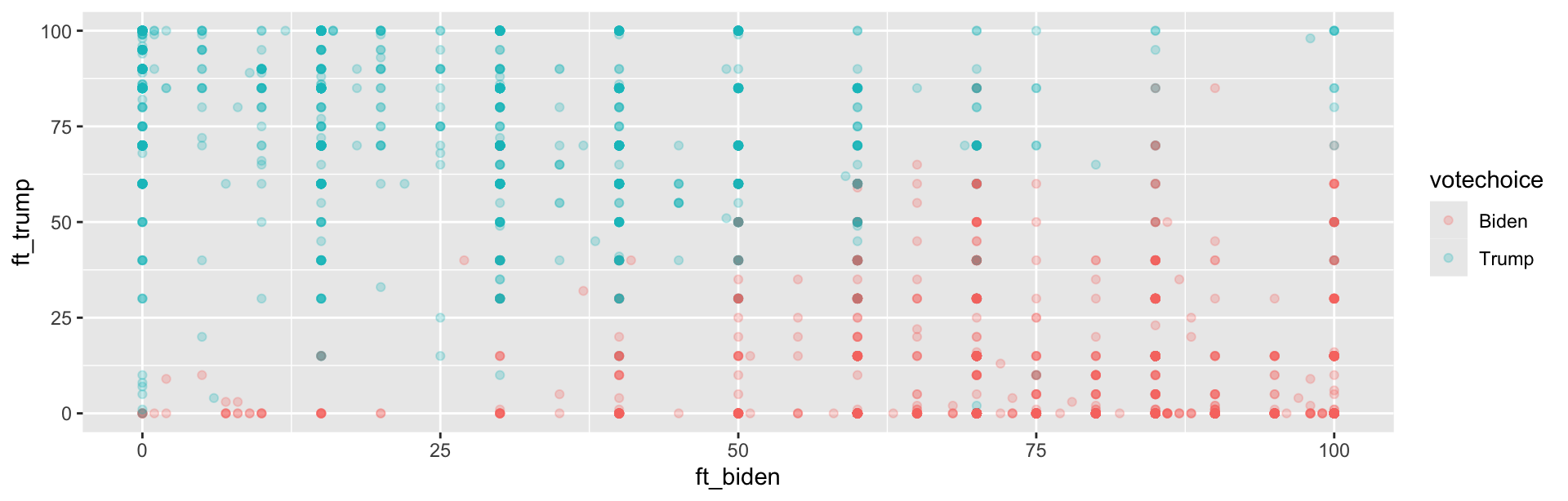
Aesthetics — which variable maps to which visual channel (x, y, color, size)
Geometry — what marks to draw (points, bars, lines)
You add layers with +. Note: + for plots, |> for data. Mixing them up is the most common ggplot error.
Layer by Layer: Data

Nothing. We have not said what to draw.
Layer by Layer: Aesthetics
Now there are axes — R knows the ranges. Still nothing drawn.
Layer by Layer: Geometry
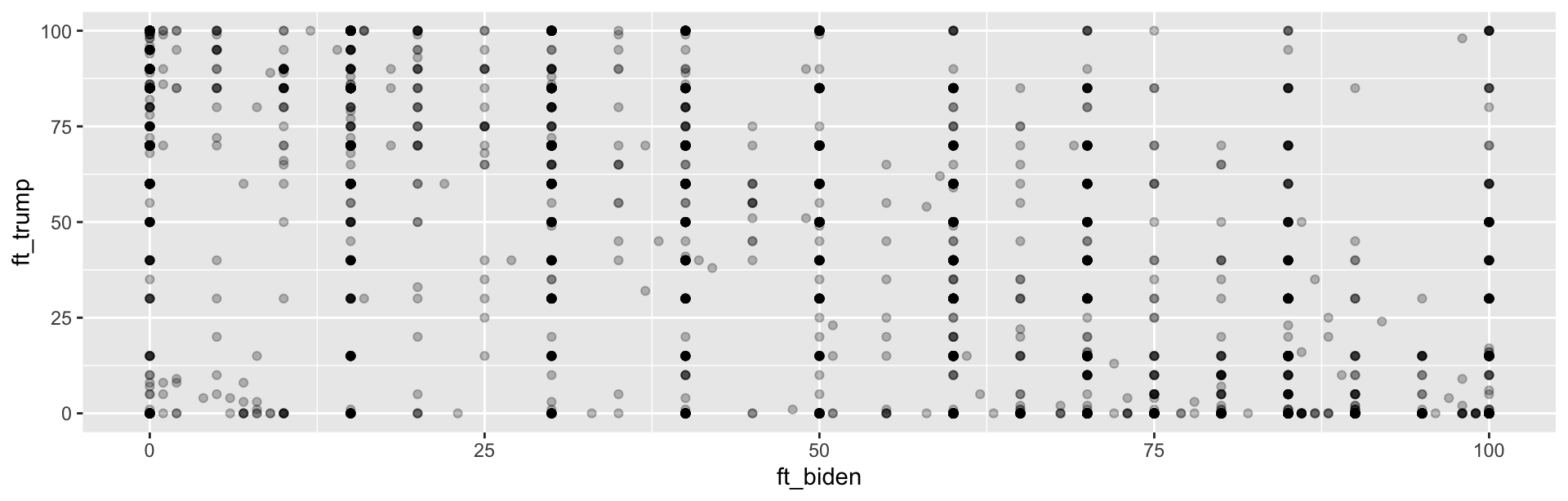
alpha makes points transparent, so we can see where they pile up.
Adding a Third Variable
Geoms You Will Use
| Geom | For |
|---|---|
geom_point() |
two continuous variables |
geom_histogram() |
distribution of one variable |
geom_col() |
a bar per group (you supply the height) |
geom_boxplot() |
distribution across groups |
geom_density() |
smoothed distribution |
Labeling Is Not Optional
You Try (4)
Make a histogram of
ft_policeMake it a different color
Add axis labels and a title with
labs()Harder: make a boxplot of
ft_policewithvotechoiceon the x-axis
The Payoff
Remember This?
Week 1, the Bertrand and Mullainathan callback rates. You now know every verb needed to build it.
Load
resumes-2.csvMake a column that is
TRUEwhen the résumé got a callbackGroup by ethnicity
Summarise to a callback rate
Plot it with
geom_col()
Try it before you look at the next slide.
The Answer
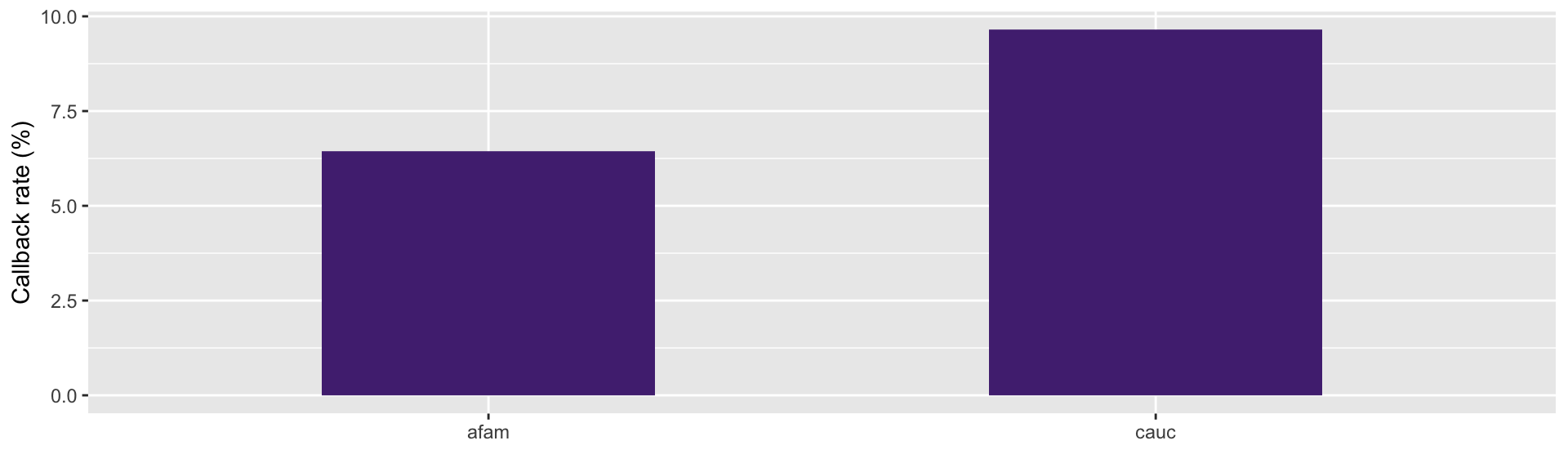
That Is the Whole Workflow
Five verbs and one plot got you a published result
Week 1 you watched me show you that figure. Today you made it.
Everything from here is about what the numbers mean
- Is 3 points a real gap, or could we have gotten it by chance?
For Next Time
Problem Set 1 goes out today, due Friday, September 4. It is a
.qmd. It must render.Read: R4DS Chapter 3 (Data Transformation)
Read: R4DS Chapter 9 (Layers) for more on ggplot
Also Read, For Next Class
Adcock and Collier (2001), “Measurement Validity: A Shared Standard for Qualitative and Quantitative Research”, APSR
Where numbers come from, and how to argue about whether they measure what you claim
Note their framing: measurement validity is a standard that applies to qualitative work too
Healy, Data Visualization, Chapter 1 (“Look at Data”) — free at https://socviz.co