POSC 8410: Getting up and running in R
Today
By the end of today you will have:
Survey data loaded on your own machine
Generated a figure
Seen your first error messages + how to deal with them
We are going to do this fast, and slightly out of order
Follow along on your machines. If something doesn’t run, stop me. You won’t be the only one having trouble!
A Warning About Today
I am going to show you working code before I explain how it works
You may not understand the first thing I show you. That is ok!
- We will start with the finished analysis, and then work back piece by piece
By the end of the week, this analysis should make sense
- You’ll have a problem set to reinforce
A Complete Analysis
Five Lines
That is a complete analysis: load a tool, load data, pick the rows you want, draw a picture.
The Result
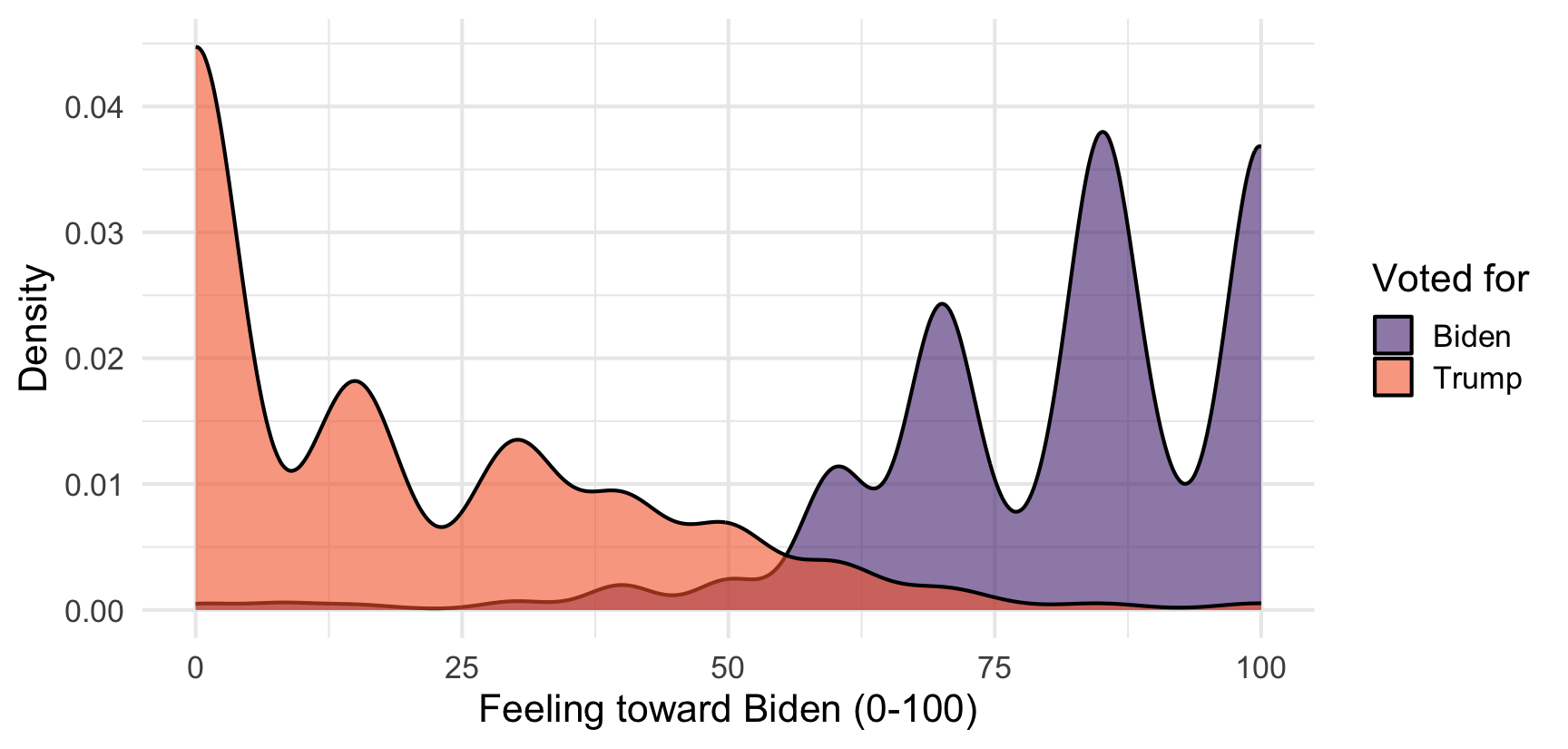
What Just Happened?
Four things, and they are the four things you will do for the rest of your career:
Load a package — borrow someone else’s code
Read a file — get data off your hard drive and into memory
Subset — keep the rows you care about
Plot — look at it
Getting Oriented
The Positron Tour
I will walk through this live. Four things to find on your screen:
Console — where code actually runs. Type here for throwaway work.
Editor — where your scripts live. Type here for work you want to keep.
Variables — everything R currently has in memory.
Plots — where figures appear.
Console vs. Script
Console: disposable. Gone when you close Positron.
- Good for: “what does this column look like?”
Script (a
.Rfile): saved. Reproducible.- Good for: everything that is part of your actual analysis
Run one line from a script with Cmd/Ctrl + Enter
Rule: if you would be annoyed to lose it, it goes in a script.
You Try (1)
Make a folder for this class somewhere sensible
Open that folder in Positron: File → Open Folder
Make a new script: File → New File → R Script
Save it as
week2.Rinside your class folderType
2 + 2, put your cursor on the line, hit Cmd/Ctrl + Enter
Hands up if you did not see [1] 4.
The Building Blocks
Objects
R remembers things when you assign them a name with <-
x now lives in memory. You can see it in the Variables pane.
Objects, continued
Names are case-sensitive and cannot start with a number.
Use names that say what the thing is
data2_FINALis a name you will regret in the future
You Try (2)
Create an object called n_states and set it to 50.
Then create an object called n_senators equal to n_states times 2.
Functions
A function takes inputs and returns something.
Functions You Will Use Constantly
c() means “combine” - it builds a vector, an ordered set of values of the same type.
Packages
Base R can do a lot. Other people have written code that does more.
A package is a bundle of that code
Two steps:
install.packages("tidyverse")— once, ever, in the consolelibrary(tidyverse)— every single session, at the top of your script
Don’t put install.packages() in a script you share. It re-downloads the internet on someone else’s machine.
Your First Error
Open a fresh session and try this before loading anything:
Error in read_csv("Data/anes.csv") :
  could not find function "read_csv"
R does not know what
read_csvisIt lives in the tidyverse, and we have not loaded it in this session
could not find functionalmost always means a missinglibrary()
Load library(tidyverse) at the top of the script, always. Then it works.
Getting Data In
Let’s Load the ANES
Put anes.csv in a Data folder inside your class folder. Then:
Error: 'anes.csv' does not exist in current working directory ('/Users/rwhorne/Dropbox/Clemson/Teaching/POSC_8410/Fall_2026/Slides').This is the most common thing that goes wrong. Let’s understand it.
Where Is R Looking?
R always has a working directory — the folder it treats as “here”
When you asked for
"anes.csv", you said: look in “here” for a file with that nameThere isn’t one. The file is in
Data/, one level down.
The Rule
In Positron, the working directory is whatever folder you opened
So: open your class folder, not a random file, not your Desktop
Then every path you write starts from your folder
This is why we set up the folder!.
Relative vs. Absolute Paths
Absolute — the full address, from the root of your hard drive:
/Users/whorne/Dropbox/POSC8410/Data/anes.csv
Relative — directions from where you already are:
Data/anes.csv
Always use relative paths. An absolute path works on exactly one computer: yours. It breaks for your coauthor, for a replication archive, and on any other device.
Do Not Use setwd()
You will see
setwd("/Users/someone/...")in older code and tutorials- It’s absolutely in some of my old scripts
It hard-codes an absolute path into your script
- Guaranteed to break for anyone else, including future you
Opening the folder does the same job
Model Setup
POSC_8410/
├── Data/
│   └── anes.csv
├── Scripts/
│   ├── week2.R
│   └── week3.R
├── Output/
│   └── figures/
└── ProblemSets/
Raw data goes in
Data/and never gets edited by handIf you cannot rebuild every number from
Data/+ your scripts, it is not reproducible
You Try (3)
Download
anes.csvfrom CanvasPut it in a
Datafolder inside your class folderAt the top of
week2.R, writelibrary(tidyverse)Below that:
anes <- read_csv("Data/anes.csv")Run both lines
You should see anes appear in the Variables pane with 7,453 rows.
Looking at Your Data
First Look
Rows: 7,453
Columns: 7
$ ID         <dbl> 200015, 200022, 200039, 200046, 200053, 200060, 200084, 200…
$ state      <dbl> 40, 16, 51, 6, 8, 48, 55, 28, 4, 6, 24, 55, 41, 51, 37, 16,…
$ vote       <chr> "No", "Yes", "Yes", "Yes", "Yes", "Yes", "Yes", "No", NA, "…
$ votechoice <chr> NA, "Other", "Biden", "Biden", "Trump", "Biden", "Trump", N…
$ ft_biden   <dbl> 0, 15, 85, 100, 0, 100, 0, 50, 85, 70, 100, 70, 0, 85, 70, …
$ ft_trump   <dbl> 100, 15, 0, 60, 90, 0, 70, 0, 0, 30, 0, 0, 100, 0, 40, 100,…
$ ft_police  <dbl> 85, 90, 40, 100, 70, 70, 60, 100, 60, 70, 50, 70, 50, 0, 60…
One row per respondent, one column per variable. This data is in tidy format, stored in a dataframe.
What Are <dbl> and <chr>?
Those tags are the column’s type, and they decide what you are allowed to do.
<dbl>— a number (“double”).ft_biden,ft_trump<chr>— text.votechoice,vote<lgl>—TRUE/FALSE<fct>— a factor: categories with a fixed set of levels, and potentially order
Types Are Not Cosmetic
Warning in mean.default(anes$votechoice): argument is not numeric or logical:
returning NA
[1] NA$pulls one column out of a data frameThe average of “Biden”, “Trump”, “Trump” is not a thing
R warns instead of failing loudly —
NAis often your first clue something is wrong
This One Works
na.rm = TRUEsays “ignore the missing values”Without it, one
NAanywhere makes the whole answerNAR is refusing to guess what a missing value should be. That is what we want it to do!
You Try (4)
Using the anes data:
What is the mean feeling thermometer toward Trump? (
ft_trump)How many rows does the data have? Try
nrow()What are the column names? Try
names()What happens if you run
mean(anes$ft_trump)withoutna.rm = TRUE?
When Things Break
Errors Are Normal
Everyone who writes code sees errors constantly. Me included!
- I make so many typos…
An error is not a big deal. It is R telling you it could not do what you asked.
The messages are terse, but they are literal
Read the last line first. That is almost always the actual problem.
The Big Four
| Message | What it means |
|---|---|
could not find function "x" |
You forgot library() |
object 'x' not found |
Typo, or you never ran the line that made it |
does not exist in current working directory |
Wrong folder open, or wrong path |
non-numeric argument to binary operator |
You did math on a text column |
Object Not Found
There is no object called
anesssEither you mistyped it, or you never ran the line that created it
Check the Variables pane: if it isn’t listed, R doesn’t have it
The Dangerous One
Now watch what happens when the column name is wrong:
Warning: Unknown or uninitialised column: `ft_bidenn`.Warning in mean.default(anes$ft_bidenn): argument is not numeric or logical:
returning NA[1] NANo error. A warning and an
NA.R does not know
ft_bidennwas supposed to beft_biden- it just reports that nothing is there
This is worse than an error, because it will happily flow into your results
How to Get Unstuck
Read the last line of the error
Check the obvious: did you load the package? run the line above? spell it right?
?function_nameopens the help pagePaste the error into a search engine (or Claude/GPT) — everyone does this, it is not cheating
Ask me
For Next Time
Make sure You Try (3) works. Next class starts with data already loaded.
Read: R4DS Chapter 2 (Data Visualization) — work through it, don’t just read
Read: R4DS Chapter 4 (Data Transformation), sections 4.1–4.3
Thursday: Quarto, the pipe, and data manipulation functions
- We finish by rebuilding the callback figure from last week